Wednesday, August 5, 2020

How to make a Squarespace website: a step-by-step guide

Maybe you’ve heard the buzz about how easy it is to make a Squarespace website, or maybe you’ve been charmed by one of their A-list brand ambassadors. No matter how you got interested in Squarespace, you’re probably here for one reason: you have a website idea and want to “make it real.”

How to get a Squarespace website
Anyone can make a Squarespace website. Here’s how. Illustration by OrangeCrush

As an alternative to Wix or other website builders, Squarespace is a great platform for creating a website, even if you have no previous experience. The WYSIWYG interface makes building a webpage as easy as dragging and dropping, while the preset templates give you the structure and setup of a professionally made site.

Still, there’s a bit of a learning curve, and the user-friendly interface has a limit to its friendliness. So if you want to know how to make a Squarespace website, we have created this practical, step-by-step guide that answers the most common questions, with screenshots to avoid further confusion.

How to make a Squarespace account
—

Before you do anything, you need to set up a Squarespace account. You will need a Squarespace login every time you want to edit your site.

1. Go to the Squarespace main website.

2. Although there are a few different paths to get to the Account Creation page, the fastest is to click on Log In in the upper-right corner of the main page.
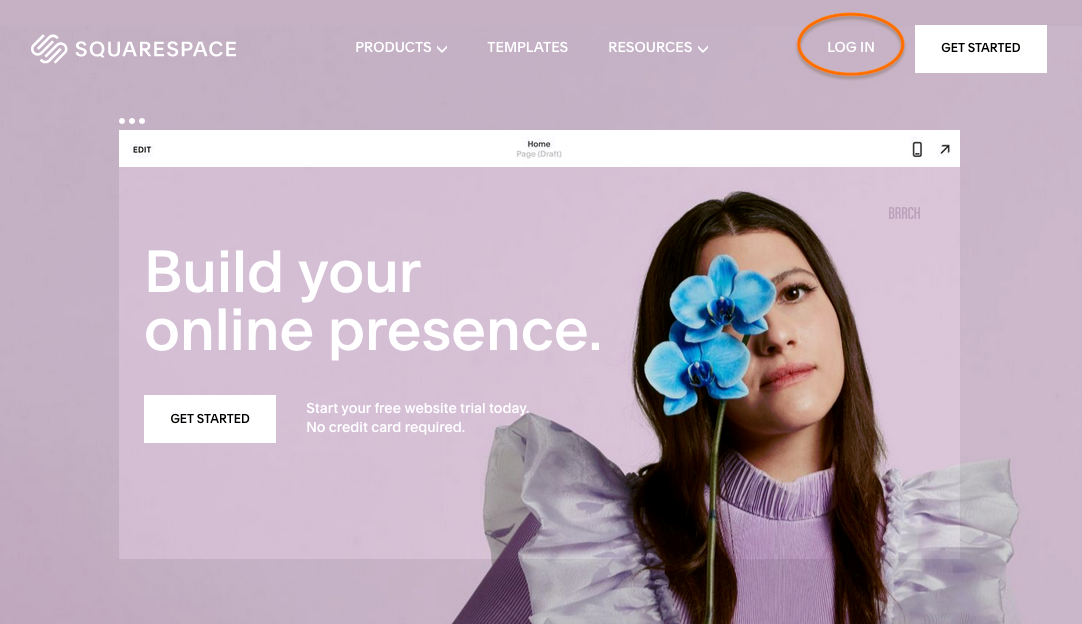
How to make a Squarespace website screenshot

3. Click Create Account in the upper-right corner.
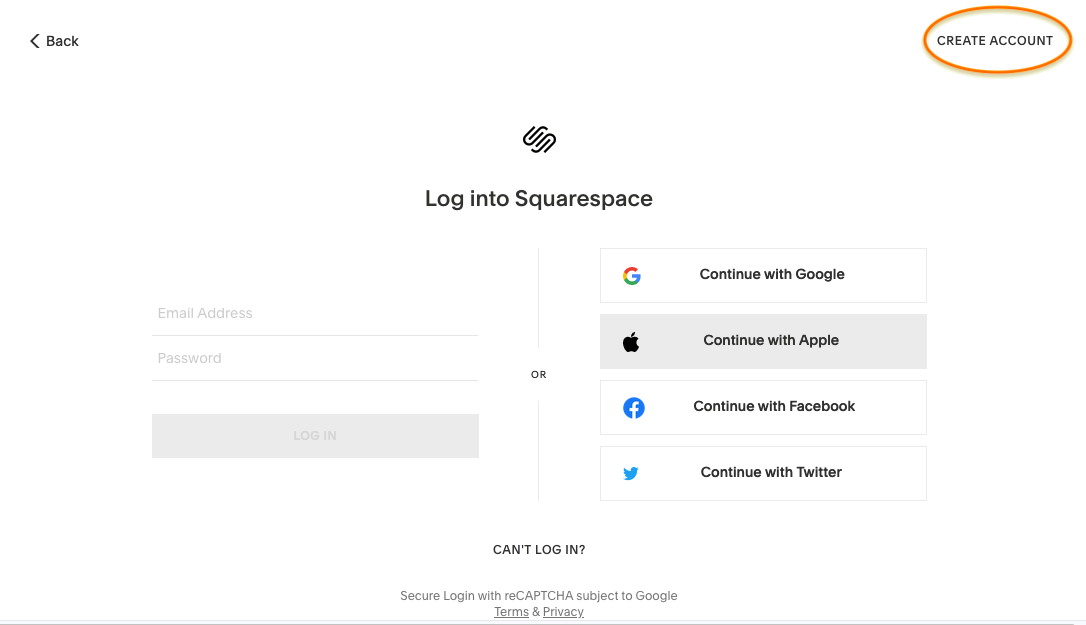
How to make a Squarespace website screenshot

4. You have your choice of ID: Google, Apple or general email, plus Twitter or Facebook in Other Options. This will be your account ID, although you’ll get to personalize your password.
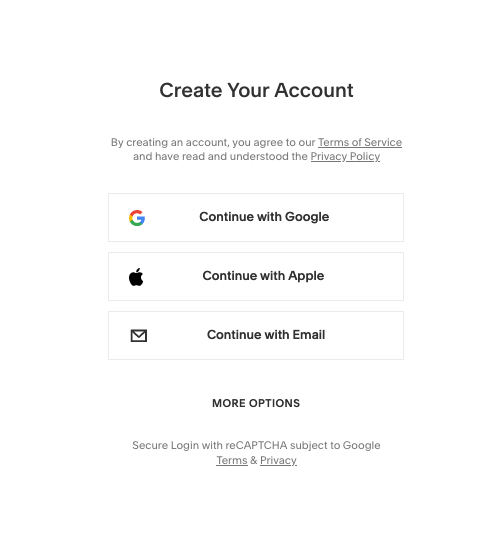
How to make a Squarespace website screenshot

5. That’s it for now. From here you’re taken directly to the site editor, although your account has already been created. You can log back in any time to continue where you left off. You don’t have to worry about payment or credit card information just yet.

How to make a Squarespace website
—

Once you have your account, you can start creating your Squarespace website anytime.

1. After logging in, you’ll go to Your Account Page. Click anywhere in the big empty box, or click Create a Site in the upper-right corner. They both go to the same place.
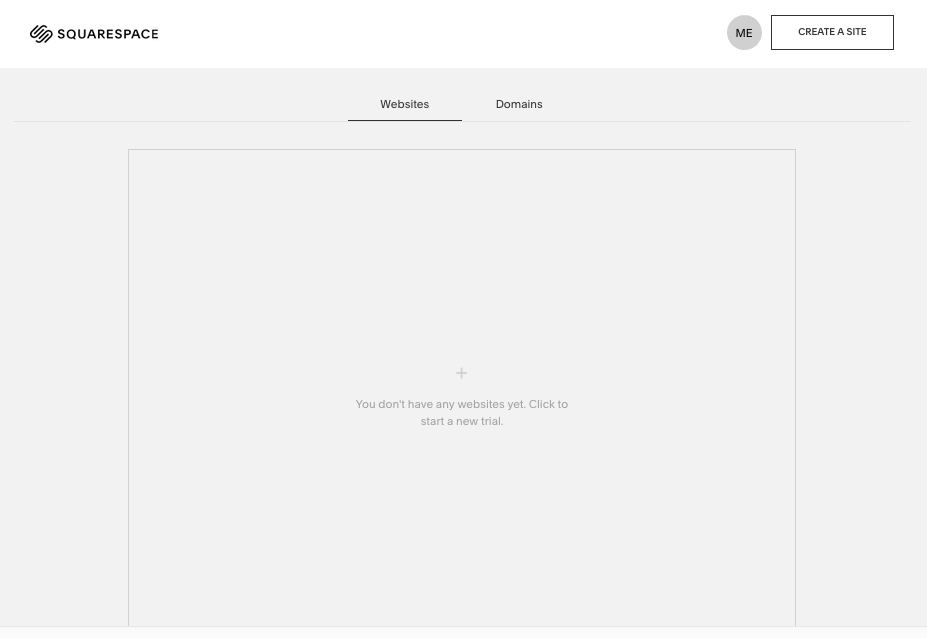
How to make a Squarespace website screenshot

2. Now you’re in the Squarespace Templates page. Choosing your template is the single most important decision you’ll make when building your Squarespace website. (Unless you’d rather get your own unique design, in which case you can work with a designer to create a custom Squarespace web design just for you—yes, that’s an option too! More on that at the end of the article.)

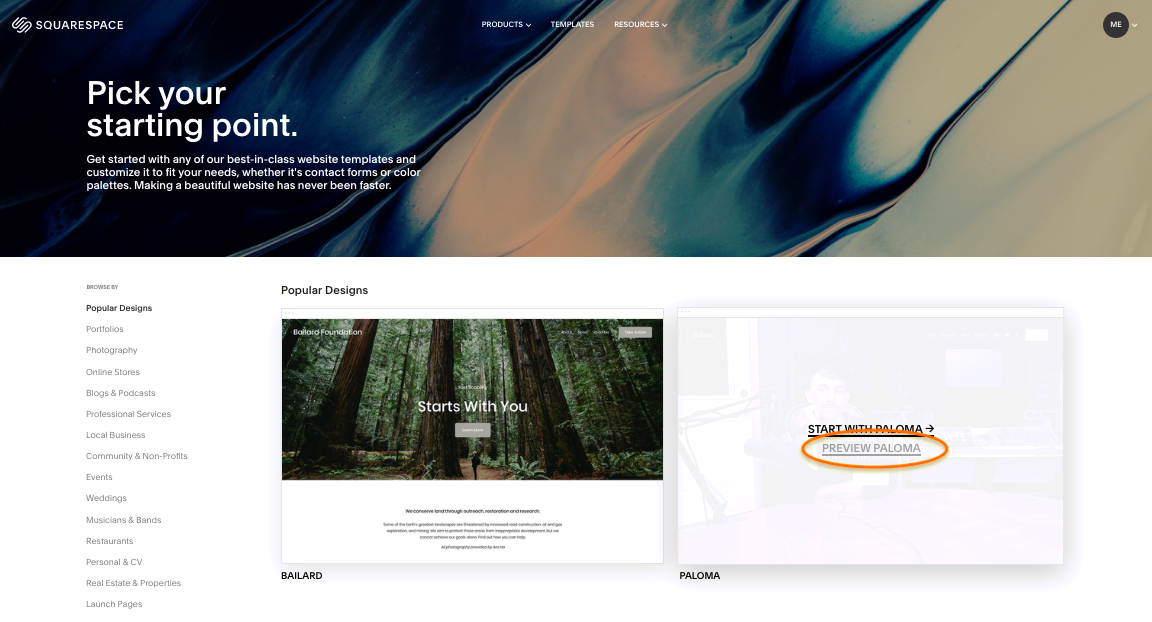
Since choosing a great template is so important, we recommend previewing a short-list of prospective templates before settling on a final choice. You can see the most popular templates by industry along the left vertical menu.

To preview templates, just click Preview by the template you’re interested in.
How to make a Squarespace website screenshot

3. The preview shows you sample screenshots in different modes like desktop, mobile or tablet, which you can switch by clicking the icons in the top-left corner. To browse an interactive sample of what the template looks like when it’s published, click View Demo Site in the upper-right corner.

How to make a Squarespace website screenshot

4. When you’ve found the template you want, click Start with this Design if you’re in the preview, or Start with … if you’re in the template page.

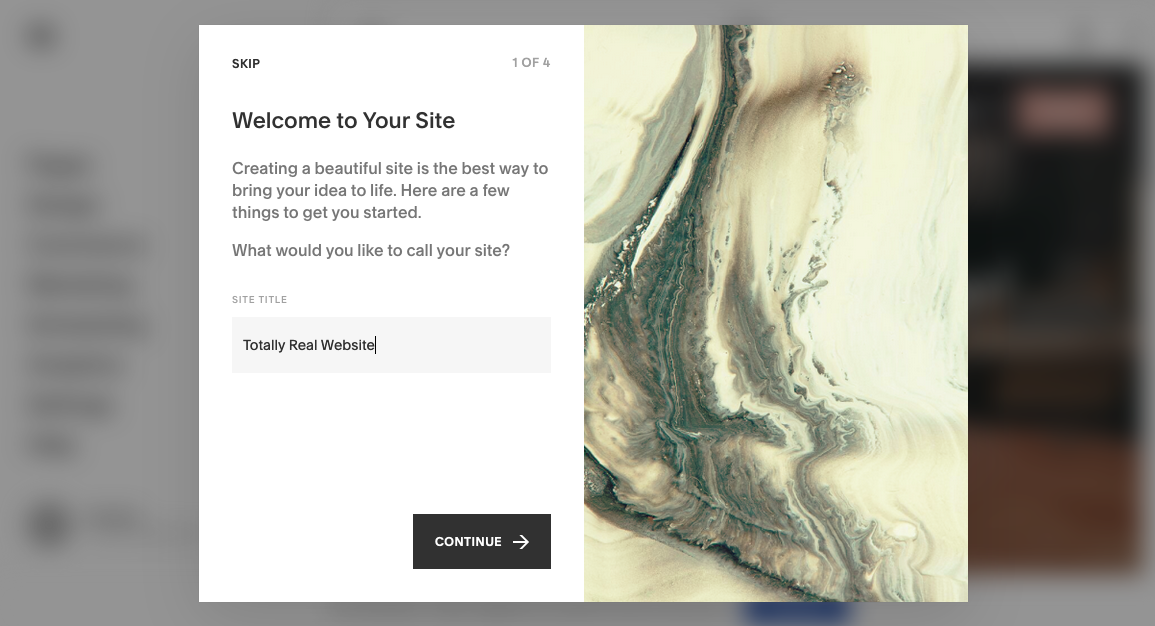
5. Now you’re taken to the onboarding assistant. Here you enter the title of your Squarespace website and read a quick tutorial on how to edit pages and design your site, or you can opt-out by clicking Skip.
How to make a Squarespace website screenshot

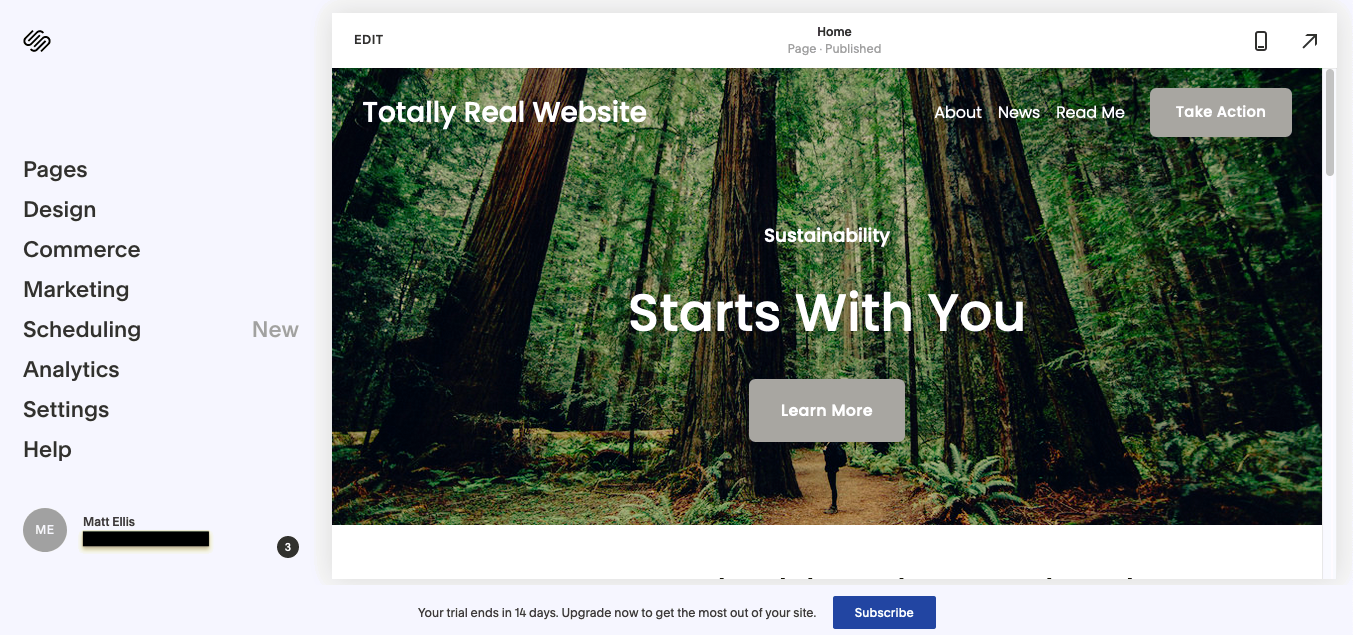
6. Now here’s where the “fun” starts. In the site editor, you’re free to design your site however you want. The editor takes some getting used to, so we recommend playing around and clicking on items you’re curious about—although we explain how to do some of the more common tasks below.
How to make a Squarespace website screenshot

In general, you can navigate the main category you want to edit on the left-hand menu—the individual pages of your website (“Pages”), the design of those pages (“Design”), ecommerce functionality (“Commerce”) and others.

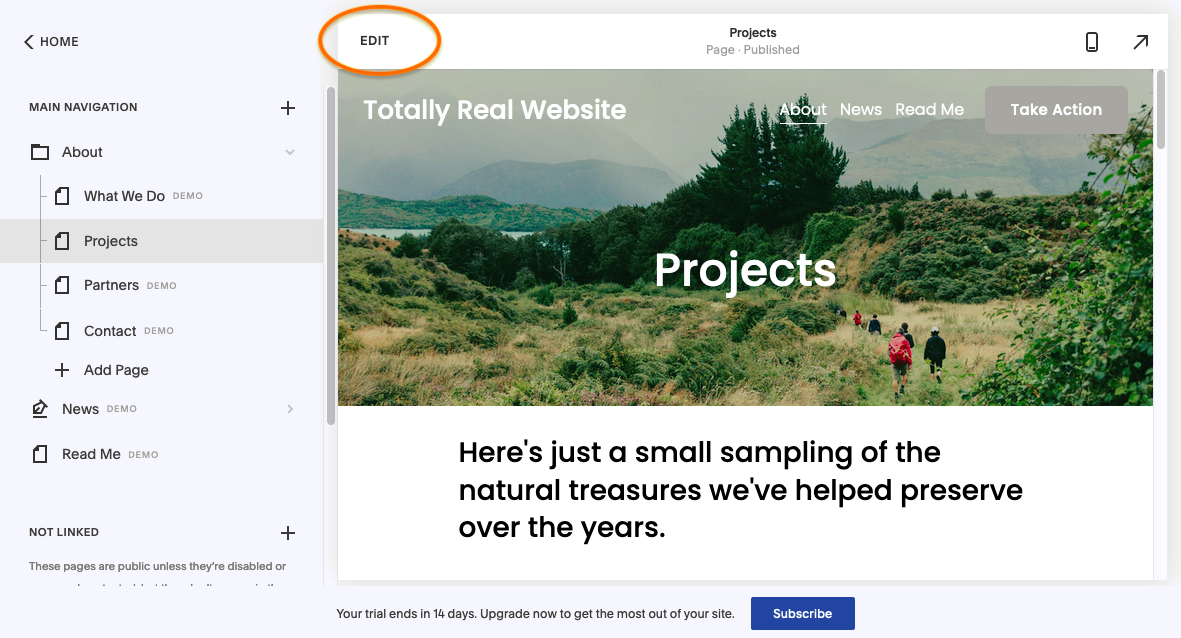
You can open the WYSIWYG editor at any time by clicking Edit in the top-left of the site preview. This is where you can change your text and images, add buttons, and more. You can also switch to a mobile device view by clicking on the smartphone icon in the upper-right corner.
How to make a Squarespace website screenshot

Feel free to experiment yourself. Depending on your project, you may need different design options, but the interface is fairly self-explanatory. Check below for specific step-by-step instructions on more complicated tasks.

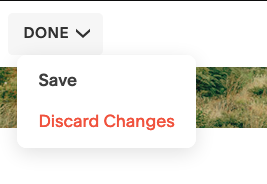
7. After you make changes in the WYSIWYG editor, you have to save (or discard) them before returning to the main editing menu. To do this, click Done in the upper-left corner and click your choice from the dropdown menu.
How to make a Squarespace website screenshot

8. To preview your site and interact with it as a user, click on the arrow in the upper-right corner. You can browse your site here, but not edit it. To return, just click the reverse arrow in the upper-right.

How to make a Squarespace website screenshot

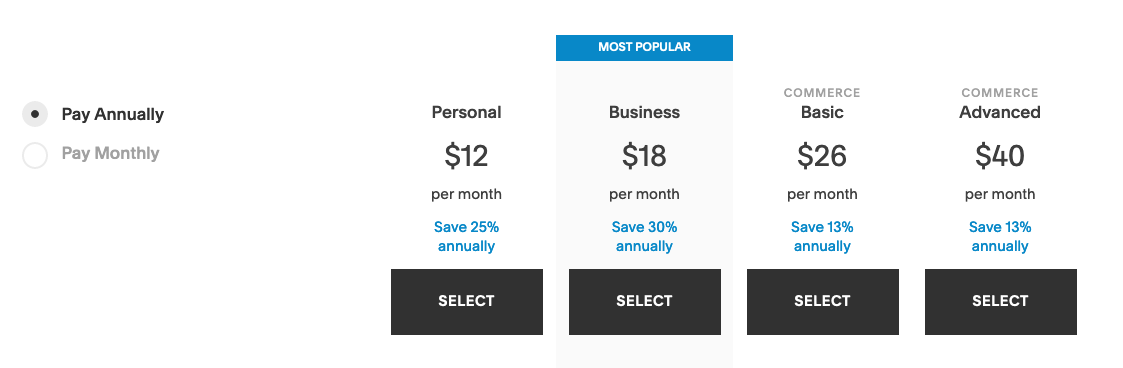
9. If you’re serious about creating a Squarespace website and want to publish your page, at some point you’ll need to subscribe to their paid service. When you’re ready, click Subscribe at the bottom of the site editor.

There are four Squarespace pricing plans: two for regular businesses and two for ecommerce. To see a comparison of all the features and payments options, check out the Squarespace pricing page.
How to make a Squarespace website screenshot

From there, it’s just the standard credit card processing. Once you’ve paid, you can publish your site as soon as you want.

How to edit a page in your Squarespace website
—

Most of the Squarespace website editor is clear enough to understand, but a few common tasks in particular can trip up some users. Below we explain how to add a button, edit text and customize images in Squarespace.

How to add a button

1. Enter the WYSIWYG editor, as explained above.

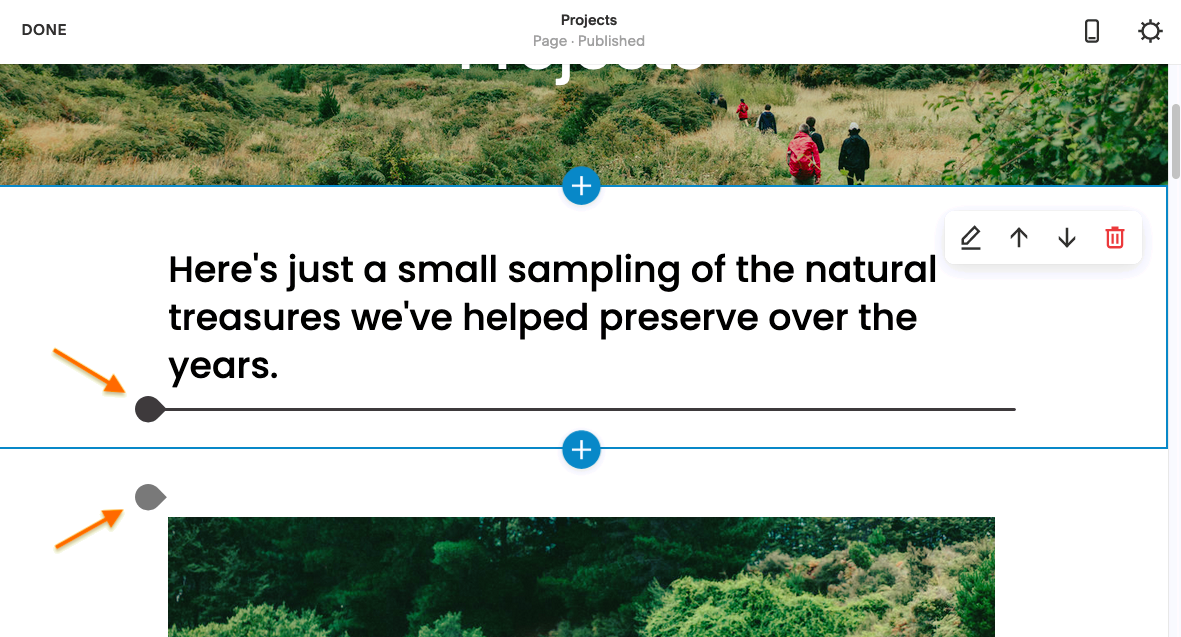
2. Squarespace website templates are naturally broken up into sections. You can see section breaks represented by gray and black circular tabs, but they only appear when you hover near them. If you want to add a new button, you need to do it in these areas. Otherwise, you can edit a template’s pre-existing button to perform the action you want.
How to make a Squarespace website screenshot

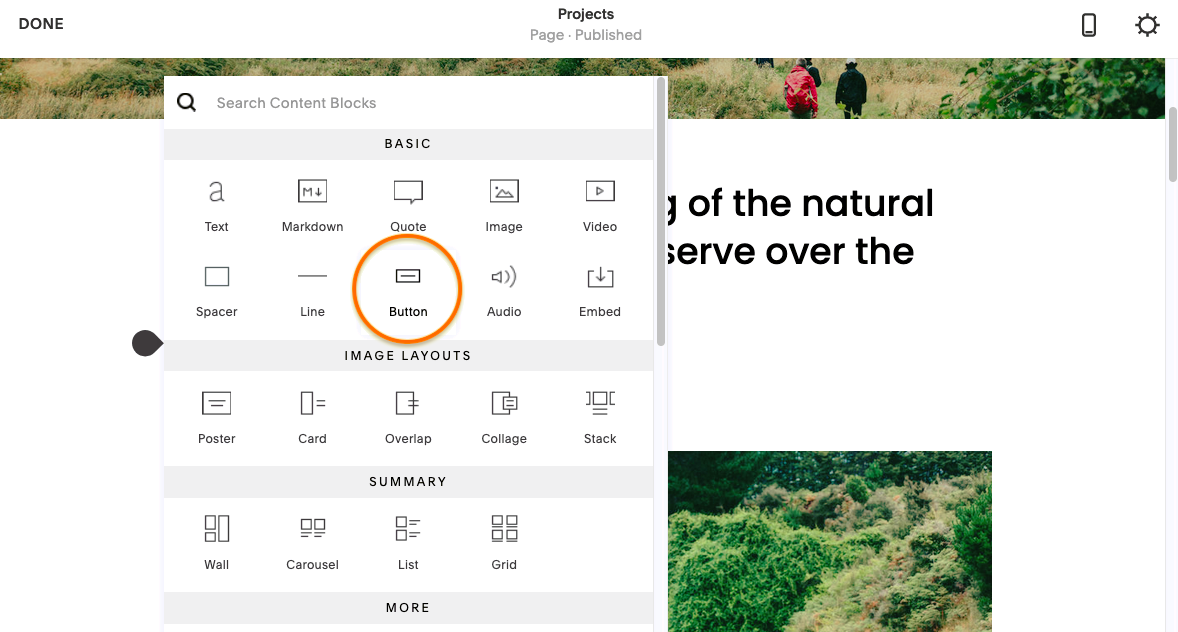
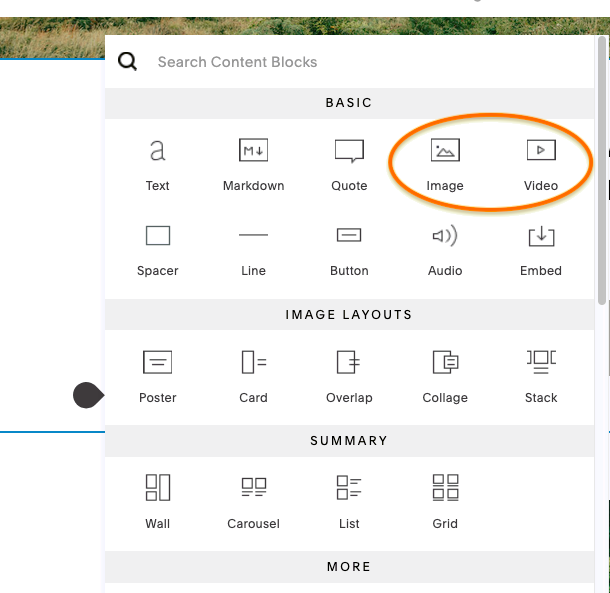
3. Clicking on the tabs mentioned above opens the Content Blocks menu. This is where you can add custom content like text blocks, images, videos, empty space or, in this case, buttons.
How to make a Squarespace website screenshot

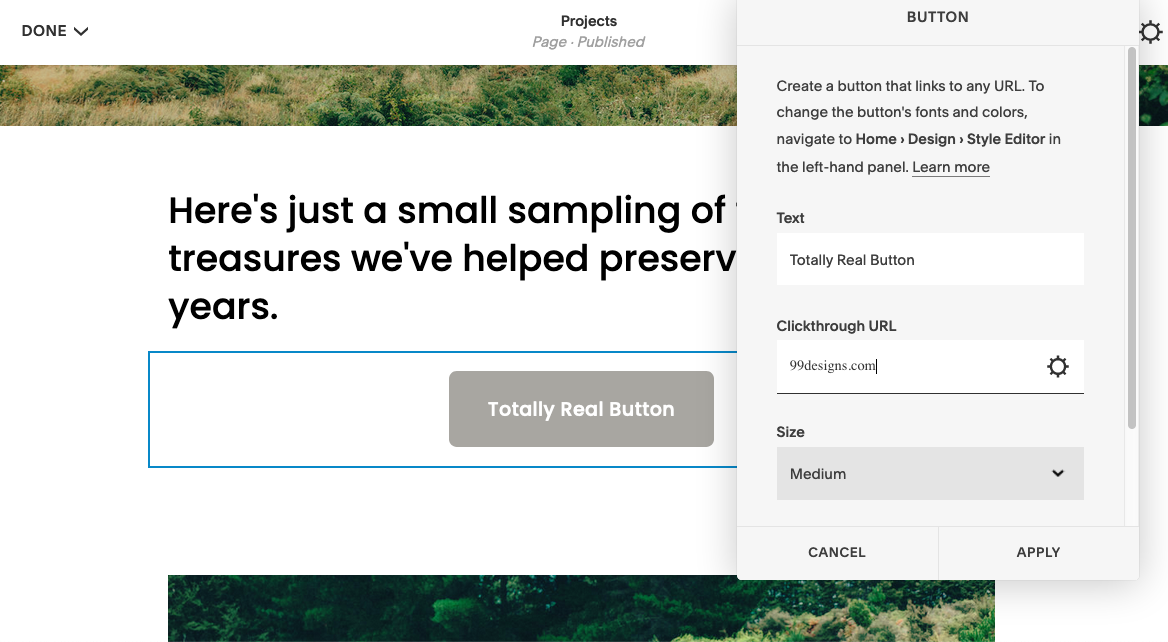
4. Click on Button in the Content Blocks menu to add a new button. You can customize the anchor text, size, alignment and destination URL in the pop-up menu here. Everything else has to be changed elsewhere.
How to make a Squarespace website screenshot

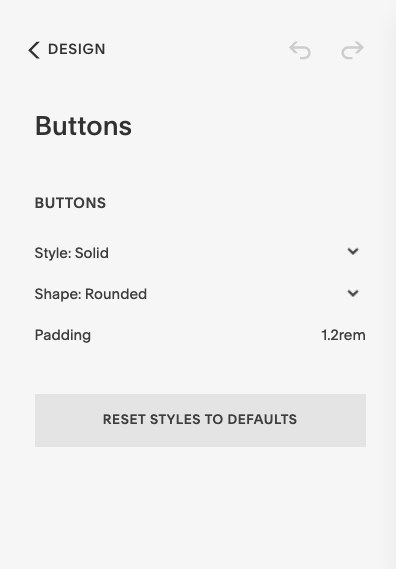
5. To change the button font and color, go to the main editing menu (just save your changes if you’re in the WYSIWYG editor). From the main menu, click Designs > Buttons to change the button defaults. Your changes affect all buttons.
How to make a Squarespace website screenshot

6. The color of your buttons depends on your overall color palette. You can also change this from the main editing menu: go to Design > Colors. Just understand that this affects the colors of more than buttons alone.

How to edit text

1. There are two ways to add and edit text in your Squarespace website. The first involves changing the text that’s already placed, compliments of your chosen template.

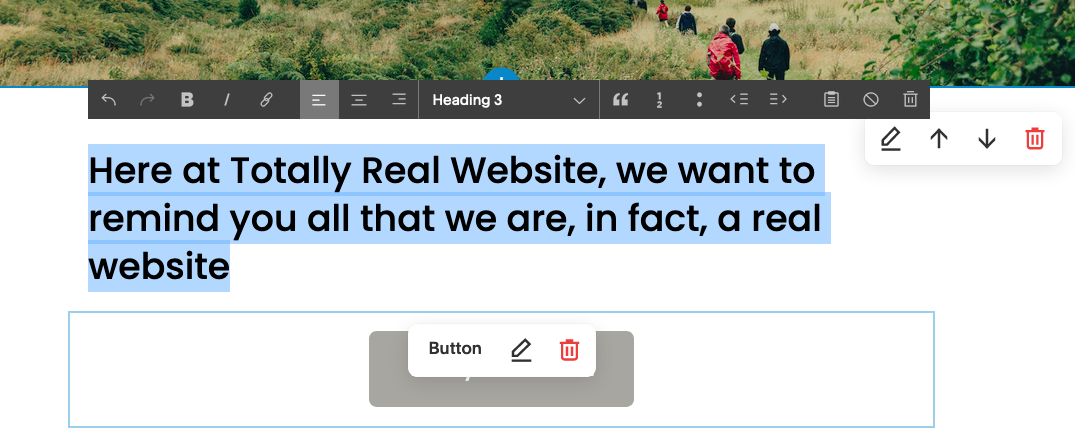
To change the pre-existing template text, just enter the WYSIWYG editor and click on the block of text you want to edit. You’ll see a text editor appear at the top, with options for text style, alignment, bullet lists, headings and textual links. (We explain how to change fonts below.)
How to make a Squarespace website screenshot

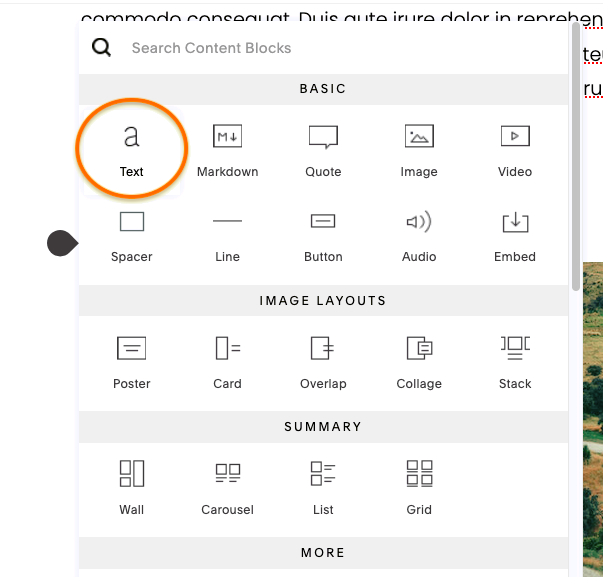
2. If you want to add text where the template doesn’t already have it, you can do so in the Content Block menu. As we explained above, click on the circular gray/black tab in between sections to open the menu, and then click Text. This will add a new text section, where you can edit text with a text editor as above.
How to make a Squarespace website screenshot

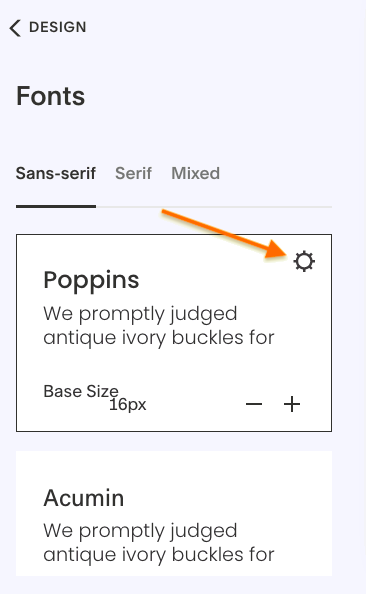
3. No matter how you enter text into your website, you have to go to the main editing menu to edit design choices like font and text size. From the main editing menu, click Design > Fonts to customize your typography.

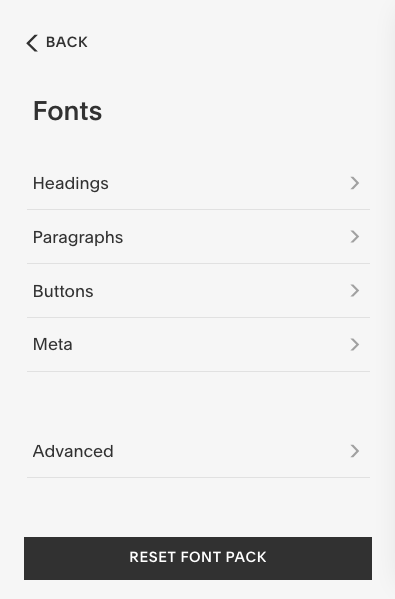
You can first choose your font, with samples for headers and body text, and a customizable size slider. However, you can more fully personalize the typography of your Squarespace website by clicking on the gear (or “sun”) icon in the upper-right corner of your chosen font.
How to make a Squarespace website screenshot

This opens the more advanced font selection menu. Here, you can customize which fonts and sizes you use for different areas, i.e., buttons, headers, price lists, etc.
How to make a Squarespace website screenshot

How to add, edit and resize images and videos

1. To edit images and videos, you first need to enter the WYSIWYG editor.

2. To edit or replace a background image or video double click on that image in the template. Be careful not to click too close to text or buttons or you will open the editor for them instead of the image. Here you can edit, delete or replace the image, or opt for a matte color in lieu of a photo.

How to make a Squarespace website screenshotHow to make a Squarespace website screenshot

Here you can also select Full Bleed (photo extends to the page border) or Inset (there’s a border between the photo and the page border), and choose your opacity if you want to play with photo transparency.

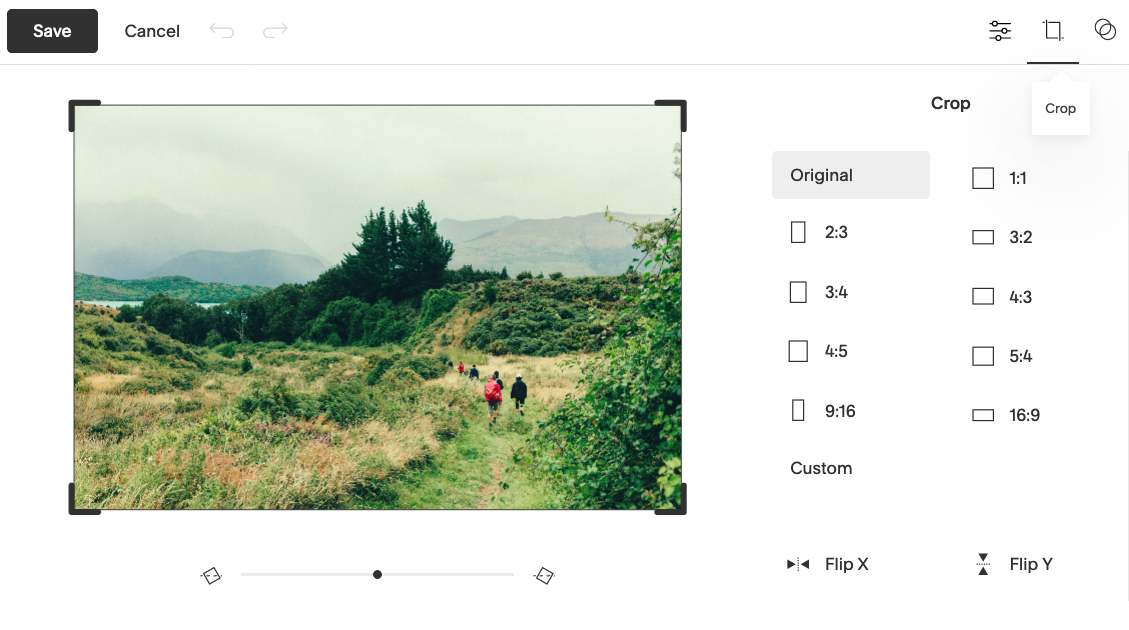
2. For more advanced options, click on Edit Image in the Background tab.  This opens the image editor, with more advanced options including resizing photos, cropping and color correction.
How to make a Squarespace website screenshot

3. If you want to add a new image or video where the template doesn’t already have one, again you can use the Content Blocks menu. Click the circular gray/black tab and then choose Image or Video.
How to make a Squarespace website screenshot

How to make a Squarespace website for ecommerce
—

In recent years, Squarespace has been ramping up its ecommerce functionality to compete with online shop builders like Shopify. This gives online retailers more design customization options that more paint-by-number ecommerce platforms don’t.

In case you don’t know how to make a Squarespace website for ecommerce, here’s a quick tutorial. Just know ahead of time that you’ll need one of the two commerce subscription plans to complete and launch an online store.

(NOTE: The beauty of Squarespace is that you can add ecommerce functionality to any template, giving you customization options beyond other online website builders. However, if you’re new to web design, it might be best to use a template specially designed for online stores.)

1. Click on Commerce in the main editing menu.

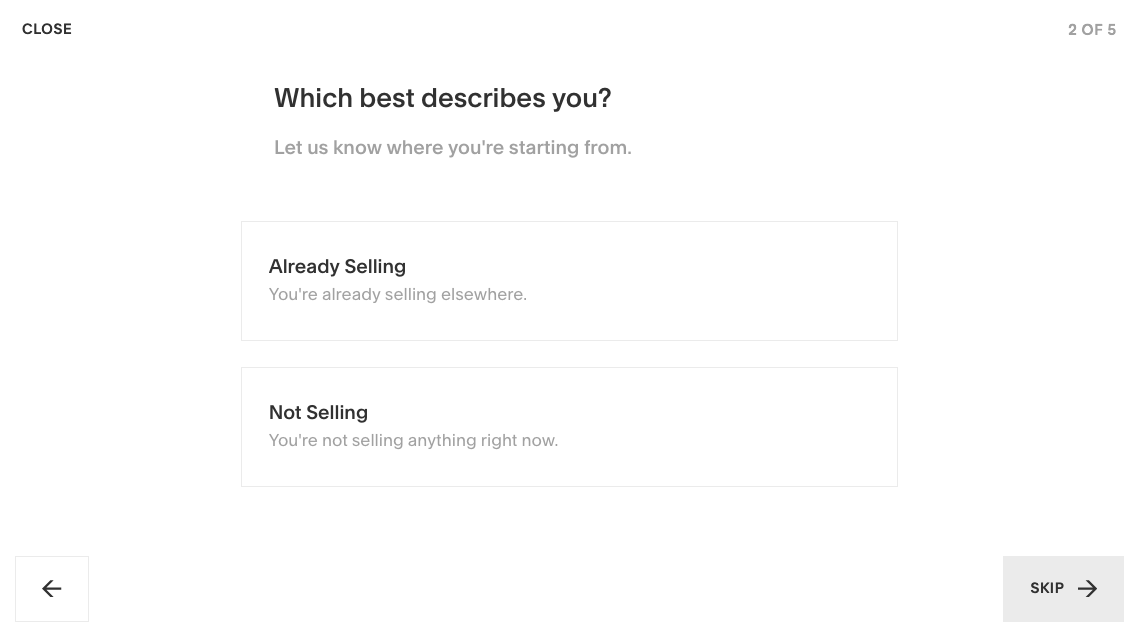
2. If it’s your first time, this opens a short onboarding assistant to help you get started. You must answer questions about your industry and product range, or you can opt-out at any time by clicking Skip.
How to make a Squarespace website screenshot

3. First, you need to set up your store pages. In the main editing menu, click Pages, then + Add Page, and then Store. Choose between two different layouts for your products to proceed.

How to make a Squarespace website screenshot

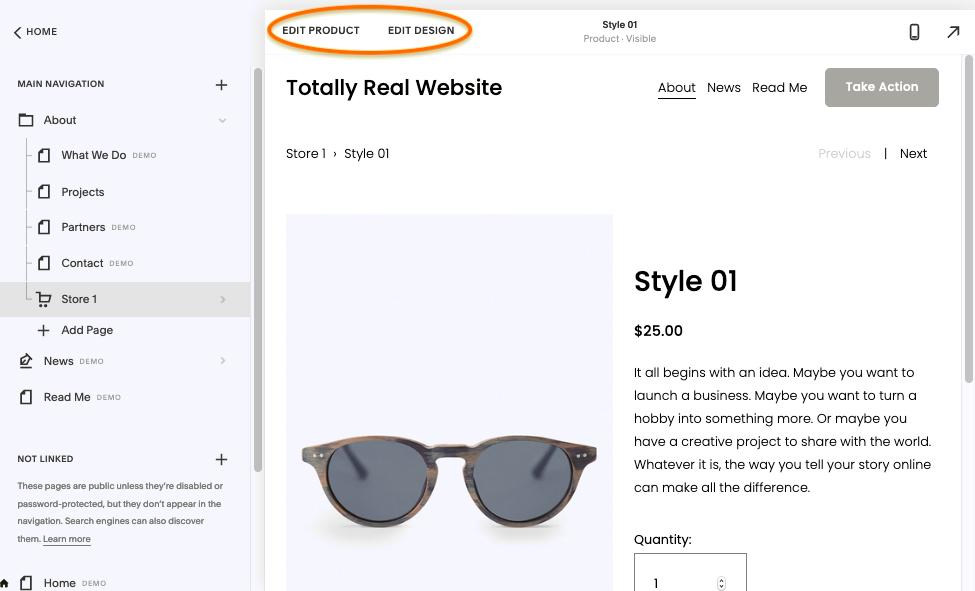
4. There are now some sample products in your Squarespace website editor. Click on the products (in the preview or the WYSIWYG editor) to open the main product editors. You’ll see options for Edit Product and Edit Design in the upper-left corner.
How to make a Squarespace website screenshot

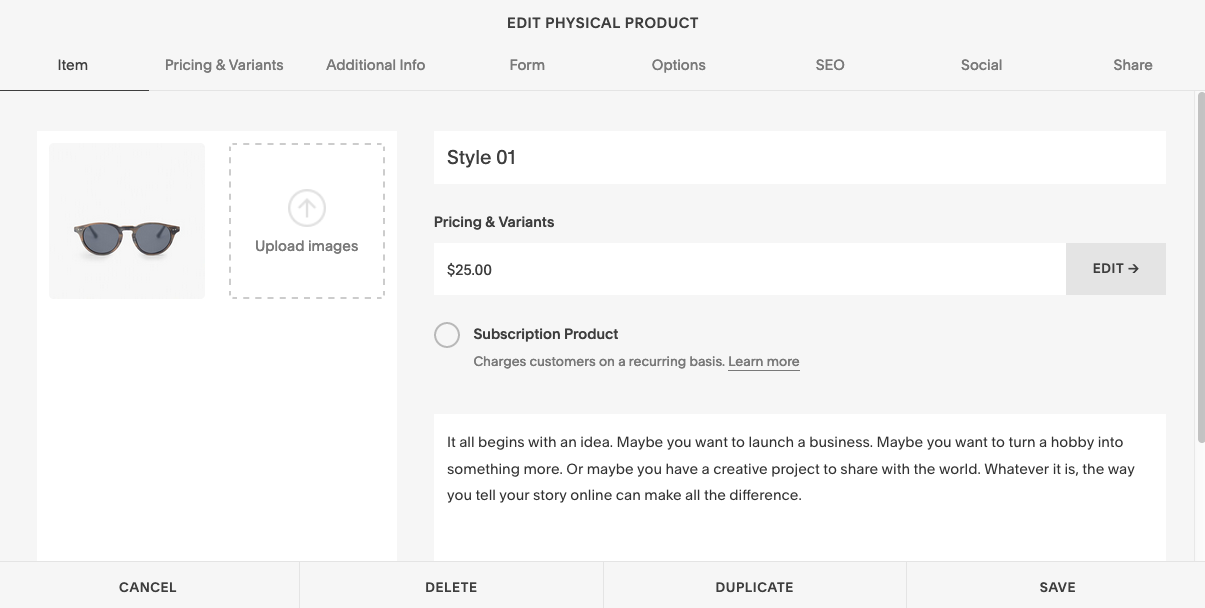
5. Click Edit Product to open the advanced product editor. Here, you can edit all the product specifics: name, price, photos, description text, variants and all the essentials, plus some extras like the option for a recurring subscription service or SEO meta data. You can also edit the social media preview in the Social tab, as well as duplicate or delete the products in the bottom menu.
How to make a Squarespace website screenshot

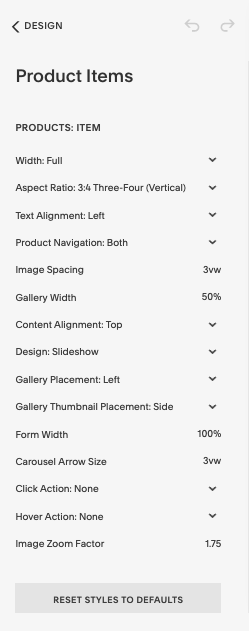
6. Click Edit Design (or, from the main editing menu, click Design > Product Items) to open the product design editor. This is where you can customize all the design elements unrelated to the actual product, such as the image spacing, alignment and general placement, as well as click actions or slideshow features. These design attributes affect all product pages.
How to make a Squarespace website screenshot

7. You need to choose your payment options before your site can go live. In Commerce > Payments, you can choose from three options for your Squarespace website: Stripe, PayPal or Point of Sale (using Point of Sale has its own requirements, including a Square Reader).

Here, you can also change the store currency.

8. You also need to specify your shipping method in Commerce > Shipping. This is where you select your shipping method, as well as edit the specific formulas for how much to charge per location, percentage of markup and the shipping provider. Different shipping methods have different parameter options.
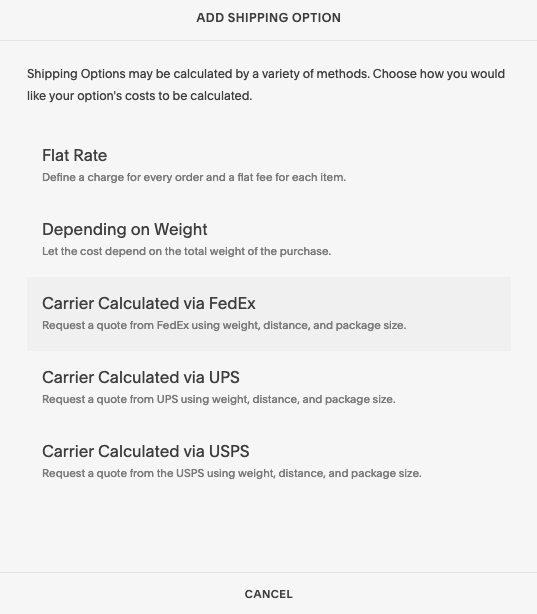
How to make a Squarespace website screenshot

9. That’s all you need to launch your store, but there’s plenty of other useful perks in the Commerce tab.

  • In Commerce > Checkout, you can fine-tune your checkout options and enable perks like abandoned cart emails, minimum order amounts or Express Checkout.
  • In Commerce > Inventory, you can see a quick-list of all your product pages, for fast editing and updating.
  • In Commerce > Customers, you can see customer data, including orders and total spent.
  • In Commerce > Discounts, you can set promotional campaigns like coupon codes or flat-discount sales.

Each business model has its own needs, and there’s plenty of customization options available. If you’re looking for something in particular that we haven’t mentioned, explore the main editing menu to see for yourself.

Should you use a template or get a custom Squarespace web design?
—

mid section of homepage showcasing the variety of experts
You can hire a Squarespace Expert to design a custom page for you

Squarespace websites are so popular because anyone can design one, regardless of web design experience. That said, if you make it yourself with little or no design experience, it’s going to look like a site made with little or no design experience. And keep in mind that the downside of using a template for is that thousands of other people are using the same template for their website. You’ll have customization options, but there’s a limit to what you can do with a template.

That can work just fine for small and novelty online stores or businesses that are just getting started, but if you’re serious about your online business, you may want a site that looks professional and unique. Or you may be looking for a custom look or functionality that a template just can’t offer you.

Squarespace offers a service that matches you with a professional web designer to design your site for you—you can tell them about your brand, needs and vision and explain all your web design ideas, and your expert designer will put them into action in a unique web design created just for you.

Want to get the perfect custom Squarespace web design?
Find your Squarespace Expert now!

The post How to make a Squarespace website: a step-by-step guide appeared first on 99designs.

Monday, August 3, 2020

What is brand marketing? And how to create a brand marketing strategy.

Brand marketing. Two words you’ve probably heard thrown around a lot by entrepreneurs and marketers alike. But there’s a lot more to brand marketing than you might think.

brand marketing illustration
Brand marketing tells your story by emphasizing your whole brand. Illustration by Orange Crush.

What is brand marketing? Brand marketing is a way to promote your product or service by promoting your brand as a whole. Essentially, it tells your service’s or product’s story by emphasizing your whole brand.

In this article, we’re taking a look at some of the best examples of brand marketing from top global brands and discussing how you can take cues from them as you develop your own brand marketing strategies. We’re also covering what to do and what to avoid with brand marketing to ensure your strategy’s success.

Everything you need to know about brand marketing:
—

What’s the difference between branding and marketing, and which comes first?
—

Good question. It’s important you understand the difference between branding and marketing so you can efficiently use them together. In essence, marketing is how you build awareness of your brand and its products and generate sales, and branding is how you express who your business is for and what it’s all about.

Think of marketing as your business-generating toolkit and branding as your overall approach to reaching your target audience. Branding is one of the primary building blocks of your marketing strategy, so it will always come first. If your brand was KFC, your branding would be the “secret herbs and spices” and your marketing would be everything you do to get your customers excited to try your chicken, like your TV and radio ads, billboards and social media ads. No matter what industry you’re in or how large you aim to grow, it’s important to work out who your business is as a brand before you create a marketing plan.

Stylescape designs
Once you’ve defined how your brand looks, keep it organized in a brand guide. Brand guide design by ludibes.

That means clearly identifying your company’s personality. In other words, defining your brand. This means carefully choosing your illustrations, logo, typography and business colors to embody your brand’s values. For example, if you’re a bold brand, you’d likely choose a bright color palette and a punchy copy voice. If you’re a timeless, traditional brand, you’d probably go with more muted colors and a sophisticated font for your website and email template. These design choices are the foundation for your marketing strategy.

When is brand marketing most successful?
—

screenshot of Colgate Oral Care Center website
For Colgate, effective brand marketing means being the go-to oral health expert. Via Potion.

You’re in it for the long game with brand marketing. It works best when your goal is to create repeat buyers (for instance when it comes to everyday products) or to connect with buyers making long-term, expensive purchases like vehicles. This is because a clear brand creates recognition and ignites a distinct feeling about it that will stay with your audience forever.

print ad showing a prominent diamond ring
A print ad with strong brand marketing. Flyer design by L.W Dezigns.

For example, a tourist will know they can trust Colgate toothpaste to keep their teeth clean wherever they are in the world. Colgate has taken a unique approach to their brand marketing over the years, deciding to educate their audience, rather than just push products to them. They’ve started an Oral Care Center, which hosts a series of videos about oral hygiene, and they also share important facts about how to care for your teeth on all their advertisements, particularly their social media platforms. This brand marketing strategy has helped Colgate to not only sell toothpaste, but to become one of the most trusted oral care brands around the globe.

The more thorough you are in your brand marketing strategy, the greater your likelihood of thriving when you execute those strategies. Investing in a solid brand marketing strategy now will make your future marketing campaigns easier to execute, because you’ll have guidelines to follow and past successes to build upon.

Here are three questions every business should answer when putting together their brand marketing strategy:

  1. Who is your target audience?
  2. What is your brand’s primary goal?
  3. How does your brand define success?

Understanding the answers to these simple questions will help define what your objectives should be, how you should talk to your audience and how you’ll measure your success.

overhead photo of red and white sneakers
Brand marketing communicates where your brand fits into the world. Logo and brand identity design by sheva™.

Three of the best brand marketing strategies in the business
—

Apple, McDonald’s and Nike are three brands that almost anybody in the world will recognize. How did they reach this point? Effective brand marketing!

Apple’s brand marketing strategy

Apple’s brand marketing strategy is simple. Don’t just create a brand, create a movement. In all of Apple’s marketing efforts, they don’t just sell their newest phone or tablet, they sell a lifestyle. From their crisp white packaging and their provocative taglines (Think Different being one of their most famous) to their event-like product launches, Apple’s brand marketing makes people feel like they need Apple products to improve their lives.

Apple packaging
Apple’s packaging is more than a brand, it’s part of a movement via Swedbrandgroup

This brand marketing strategy has created a dedicated fandom. Apple recognizes their fandom’s staying power and with it in mind, never strays away from their comprehensive brand. Even when their marketing executions change, their clear, modern and innovative brand marketing strategy remains the same.

Steve Jobs at an Apple launch
Apple’s product launches are events that excite the whole world. Via Financial Times.

Nike’s brand marketing strategy

Nike’s brand marketing strategy involves not just selling a product, but selling a story. From their website to their product descriptions to their social media, Nike takes every opportunity to tell a story about their products, their beginning or their ideas.

Nike product description showing a red sneaker
Nike is an expert at telling stories, from their social to their product descriptions. Via Entrepreneur.

Adding a storytelling element to your brand or giving your customers the background of your business story adds a human element to your business and may be a great marketing strategy for you. Remember, your story doesn’t have to be groundbreaking. Simply explaining where you came from and giving your customers something to relate to is far more influential than just selling a product.

Nike print ad featuring Colin Kaepernick
Nike’s print ads always do more than sell a product, they tell a story. Via Business Insider.

McDonald’s brand marketing strategy

According to numerous studies, McDonald’s is one of the most recognized brands around the globe. So it’s no surprise their brand marketing strategy relies heavily on brand consistency. Their golden arches are instantly recognized everywhere from America to India to Australia, and people associate their brand with feeling happy.

collection of McDonald’s merchandise
When a brand is as big as McDonald’s, even merchandise without the company’s name is instantly recognizable. Via McDonalds.

How has McDonald’s created such a distinguishable brand? Well, they’ve kept their brand identity and product consistent for over 60 years, while making thoughtful and on-brand improvements. Their logo has remained relatively the same and their marketing taglines have unrelentingly endorsed the same message: we make you happy. Here’s a few ways they’ve said it over the years:

  • You deserve a break today (1971-1975)
  • That’s my McDonald’s (1981)
  • Have you had your break today? (1995-1997)
  • Smile (2001-2003)
  • I’m lovin’ it (present)

When you’re creating a brand marketing strategy, invest in something that has longevity. You don’t need to reinvent the wheel every time you create a new marketing campaign or logo. In fact, doing so could create more harm than good because inconsistency and extreme changes will likely confuse and even alienate your audience.

the first McDonalds restaurantMcDonalds billboard

Brand marketing in five simple steps
—

Brand marketing isn’t reserved for industry giants like Nike, Apple and McDonald’s. Any brand, at any size, can pull it off by nailing five simple steps.

1. Understand your brand purpose

animated social media ad
This ad answers almost all the questions above. It’s a high-tech cap that kills bacteria fast, making health-conscious buyers feel their water is safe when they use it. Social media ad via Maryia Dziadziulia.

Understanding why your brand exists is core to your brand marketing strategy. Ask yourself these questions to help you nail your brand purpose.

  • Who is your target audience?
  • Why would they trust you?
  • What does your brand make them feel?
  • What challenge does your brand solve?
  • Who are your competitors?
  • What is your brand’s background story? Why was it created in the first place?
  • If your brand was a person, who would they be and why?

This first step is where you’ll start defining how your brand will look and feel. This means choosing your brand color palette, typography and imagery. If you’re not already familiar with how to represent your brand persona through visual design choices, take a look at our resources on how to design a logo, logo colors, font choices, visual design styles and logo shapes.

 2. Research your target market

Understand who your customers are by creating customer personas. A customer persona is a comprehensive picture of your perfect purchaser. It will help you create an emotional connection with your audience. For example, if you’re selling small budget vehicles, your customer persona might be an 18-25 year old female university student who’s looking for her first car. When crafting your customer persona, ask yourself questions such as:

  • How old is this person?
  • Are they married?
  • Where do they live?
  • What is your job?
  • What do they do every day?
  • What’s their educational background?
  • What was their most recent purchase and where do they like to shop?
  • What do they care about?
  • What do they need from my product or service?
simple black and white logo of a car made from a couch
A clear vision of your ideal customer persona will guide everything from your business name to the art style you choose for your logo. Logo design by Desana.


billboard ad showing wine bottles against a beachy background
This billboard tells the story of a city slicker being briefly transported to a tropical paradise by enjoying fruity, delicious wine. Billboard design by MindArt89.

3. Define and sell your story

You can sell your brand’s story by creating the right message. The story you craft and sell will connect your brand with your target audience, encourage loyalty and help with brand recall. Take time to really develop an engaging story that has all the same elements as your favorite novel or movie: characters, a conflict, a resolution.

The story doesn’t have to be dramatic; it can be as simple as your grandparents deciding to open a bakery in town 50 years ago and passing the business and their beloved recipe on for generations, then you finding ways to make their iconic cakes and pastries with all organic ingredients, offering the community healthy, delicious baked goods. Capture your market’s attention with a great story, then let them be part of the story by interacting with your brand.

round logo showing a nurse holding a giant spatula
Sometimes, the story is more subtle — like in this logo for a keto bakery. Logo design by Asaad™.
black and white illustrated logo of tentacles coming out of a radish
If your brand’s weirdness is what sets you apart, don’t be afraid to get weird in your branding. Logo design by olimpio.

4. Get to know your competitors

Just like getting to know your own audience, it’s equally important to get to know your competitors. Research them, determine how you’re different from them, then focus on this difference in your marketing messaging. For example, if your competitor is known for being the cheapest, you may want to focus on why quality is more important than price in your communications.

5. Create brand guidelines

Once you understand your brand and audience, think about how to connect them in your marketing. Creative brand guidelines are where you’ll cover your logo, colors, fonts, tone of voice and more. It will help any designers and marketers you work with tell your brand’s story and deliver your message in the best possible way, as well as ensure brand consistency.

style guide for fashion brand
Brand guidelines are an important part of brand marketing. Brand guide design by Terry Bogard.

Three things to avoid when you’re developing a brand marketing strategy
—

When you’re developing a brand marketing strategy, make sure you avoid these pitfalls:

1. Skipping checking out your competitors

Imagine creating a brand marketing strategy and rolling out your messaging in the form of marketing materials, only to realize that your competitor has already done a very similar thing. This happens all too often, and the best and only way to avoid it is to thoroughly research what everyone else in your industry is doing before you get started.

juice product packaging showing fresh fruits and the juicing process
If you’re selling juice, make sure to see what other brands are doing with their packaging. Product packaging via FreshApple.

2. Having inconsistent creative

Having different creative executions each time you go to market with a different piece of communication might seem fun, but it’s actually confusing for your audience and damaging to your brand. For example, if you own a burger chain, you wouldn’t want to push a celebrity endorsement video at the same time as an animated ad about your ingredients. It would get confusing for your audience as they’re trying to recognize your brand, and it would also be more expensive to produce. The same goes for voice consistency across channels. Whether you’re talking to your audience on social media, via a print ad or a video, you want to make sure your voice always sounds like your brand. Remember, even if you’ve seen your communications and messaging hundreds of times, your audience hasn’t.

Instagram images showing different bottled products against bright backgrounds
Consistent creative is key to creating a strong brand marketing strategy. Instagram post design by Pepper Pack Design.

3. Lacking a long-term vision

Without goals and a brand mission, your brand marketing strategy will not be focused and may lack direction. It’s important to know what you want to achieve in the long-term, rather than just having short-term goals. An example of a long-term goal might be expanding internationally, bringing new products to market or creating a large social media presence.

blue and yellow brand guideline booklet
Cover everything in the brand guide, even branding needs you don’t yet have. Brand guide design by Terry Bogard.

Good brand marketing is key to a successful business
—

Remember, whether you try to create a movement like Apple, tell a story like Nike or have great brand recognition like McDonalds, the more thorough you are in your brand marketing, the simpler it will be to create, launch and grow with each of your marketing campaigns.

Product packaging for little rituals
Product Packaging for Little Rituals with a strong brand marketing strategy. Product packaging design by JianBranding.

If you’re just starting out or you’re looking to refresh and revive your brand, make learning how to create a brand marketing strategy the first thing on your to-do list.

Need help branding your business?
Our designers can create the perfect look for your brand.

The post What is brand marketing? And how to create a brand marketing strategy. appeared first on 99designs.